AnyRouter MCP Overview
Use AnyRouter from any MCP client with one URL and OAuth consent.
AnyRouter is a Model Context Protocol server. Connect a client to browse the model catalog, manage API keys, and check credits without leaving it.
https://anyrouter.dev/api/v1/mcpTo only call models, you do not need MCP. Use the Chat Completions, Messages, or Responses endpoint with an API key.
Add AnyRouter MCP to your client
Every client uses the same endpoint and OAuth flow: the first tool call sends you to AnyRouter to pick a permission level (Read-only is the default) and approve.
Claude Desktop — Connectors UI.
Claude Code — claude mcp add --transport http.
Cursor — Settings UI or ~/.cursor/mcp.json.
Windsurf — Cascade UI or mcp_config.json.
Cline — VS Code panel or cline_mcp_settings.json.
GitHub Copilot — .vscode/mcp.json.
OpenCode — opencode.json.
Other clients — any client over remote HTTP.
To add third-party servers behind the same URL, see the MCP Gateway.
What the client can do
Tools depend on the permission level you granted. list_models, get_system_status, and the knowledge-base tools are always available; the rest are gated by scope.
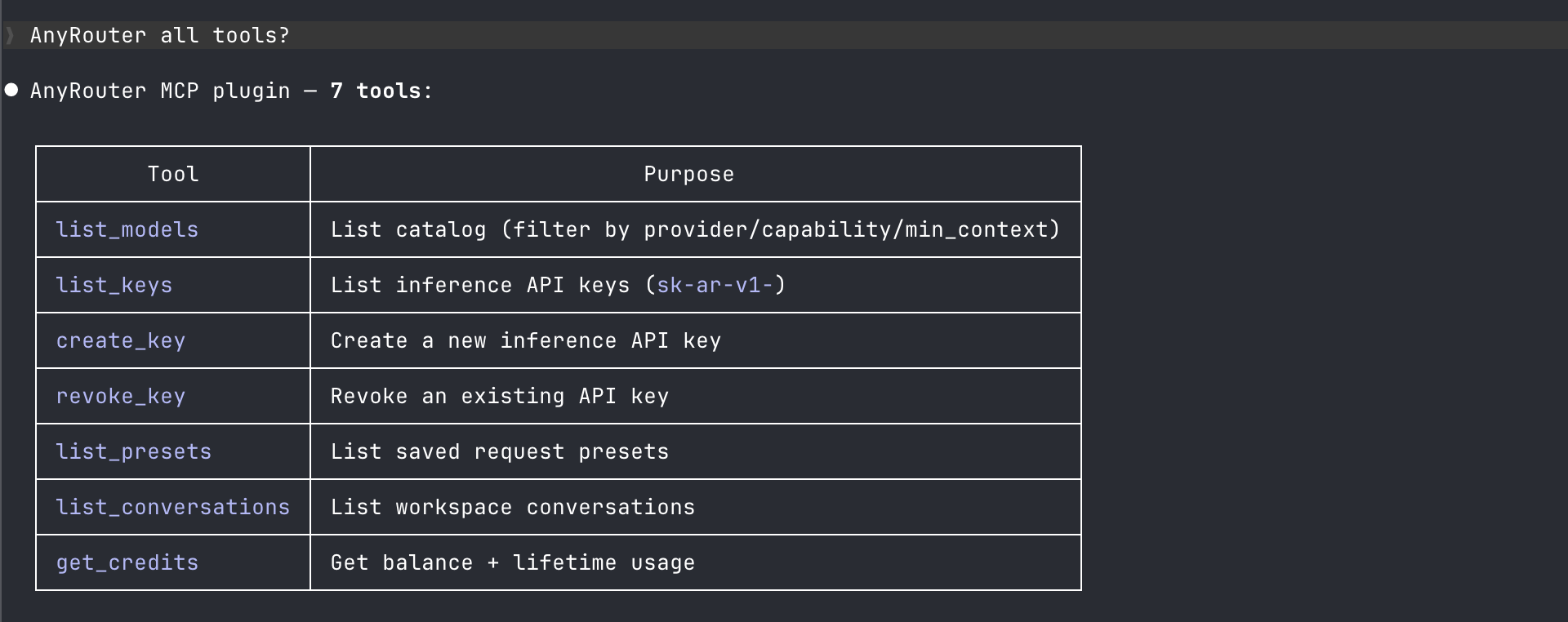
| Tool | What it does |
|---|---|
list_models | Browse every listed model. Each row has access (free, paid, byok, pool) and can_route; when can_route is false, can_route_reason is needs_key, disabled, or no_route. Filter by owner, capability tag, or job (translation, coding, reasoning, vision, cheap); sort by price or context. |
recommend_model | Ranked model ids your key can call for one job, with why, price, context, and capabilities |
get_usage | Recent workspace requests, tokens, and spend |
list_byok_keys | Which provider keys are enabled or failing, without the secret |
list_okf_concepts / get_okf_concept | Browse and read AnyRouter's knowledge base |
get_credits | Workspace balance, lifetime usage, and free-tier grants |
list_keys / create_key / revoke_key | List, mint, and disable API keys |
list_presets | List saved request presets |
list_conversations | Search workspace conversations |
publish_prompt / star_prompt / fork_prompt | Share, save, and fork community prompts |
publish_skill | Sync a SKILL.md to a hub |
get_system_status | API error rate, provider status, smoke test results |
Other tool groups:
- Connections (
list_connections,get_connection,create_connection,update_connection,delete_connection,reauth_connection,discover_connection,test_connection_tool) manage the upstream MCP servers your workspace proxies. They need the connections permission level. - Skills & Knowledge Hub (
list_hubs,get_hub,search_public_hubs,create_hub,hub_add_item,hub_import_skill). See Skills & Knowledge Hub. - Artifacts (
publish_artifact,list_artifacts,get_artifact,delete_artifact,set_artifact_visibility). An LLM key (sk-ar-v1-…) can use them. Add?tools=artifactsto the URL to list only these. See the Artifacts API. - Administrators also see
admin_*tools (admin tools).
There is no chat tool; clients call models directly. Argument schemas, scopes, error shapes, and manual authentication are in the MCP API reference.
Protocol versions
The server speaks MCP 2026-07-28 and accepts earlier versions (2025-11-25 and older). An unsupported version gets HTTP 400 with JSON-RPC error -32022 and a supported list. server/discover returns versions, capabilities, and server info.
On 2026-07-28 each request must send an Mcp-Method header matching the JSON-RPC method, plus Mcp-Name (tool name, resource URI, or prompt name) for tools/call, resources/read, and prompts/get. A missing or mismatched header gets HTTP 400 with error -32020. Current client SDKs set these for you.
The endpoint takes POST only; GET and DELETE return 405 (no event stream, no session). Every tool carries a title and hints (read-only, destructive, repeatable, open-world) that clients use to decide when to ask first.
Authorization details
For client builders; the MCP OAuth follows the MCP 2026-07-28 authorization spec.
-
Issuer. Metadata is at
https://anyrouter.dev/.well-known/oauth-authorization-server;issuerishttps://anyrouter.dev. -
isson every redirect to yourredirect_uri, includingaccess_deniedand other errors (RFC 9207). The metadata setsauthorization_response_iss_parameter_supportedtotrue; reject a redirect whoseissis missing or different. -
Resource indicators (RFC 8707). Send
resourceon both the authorization and token requests:resourceToken works on https://anyrouter.dev/api/v1/mcp(orhttps://mcp.anyrouter.dev, or any URL that reaches the MCP endpoint)The MCP endpoint only Not sent, or https://anyrouter.devEvery AnyRouter endpoint (default) Any other value gets
invalid_target(a redirect on the authorization request, HTTP 400 on the token request). A token request may omitresourceor repeat the authorized one, not widen it. -
Tokens. The access token is a revocable
sk-ar-v1-…key. There are no refresh tokens; when it stops working, run the flow again (a previously approved client skips consent).
Auto-connect and revoking
anyr claude, anyr codex, anyr opencode, and anyr grok connect the gateway for you when Auto-connect in coding agents is on in the dashboard, using the session's own key. Turn it off with --no-mcp, anyr mcp auto off, or the dashboard.
The same dashboard lists every authorized client and revokes any with one click; that client's next call returns 401 Unauthorized.
AnyRouter routes requests to third-party models. Models and outputs are provided as is, with no warranty; you use them at your own risk. Disclaimer