DeepSeek HarnessCoding agents
Run DeepSeek Harness on AnyRouter
Add AnyRouter to DeepSeek Harness as a custom model API. One base URL and one sk-ar- key bring the anyrouter/* router models into the picker.
Short link
anyrouter.dev/u/deepseek-harnessSet it up
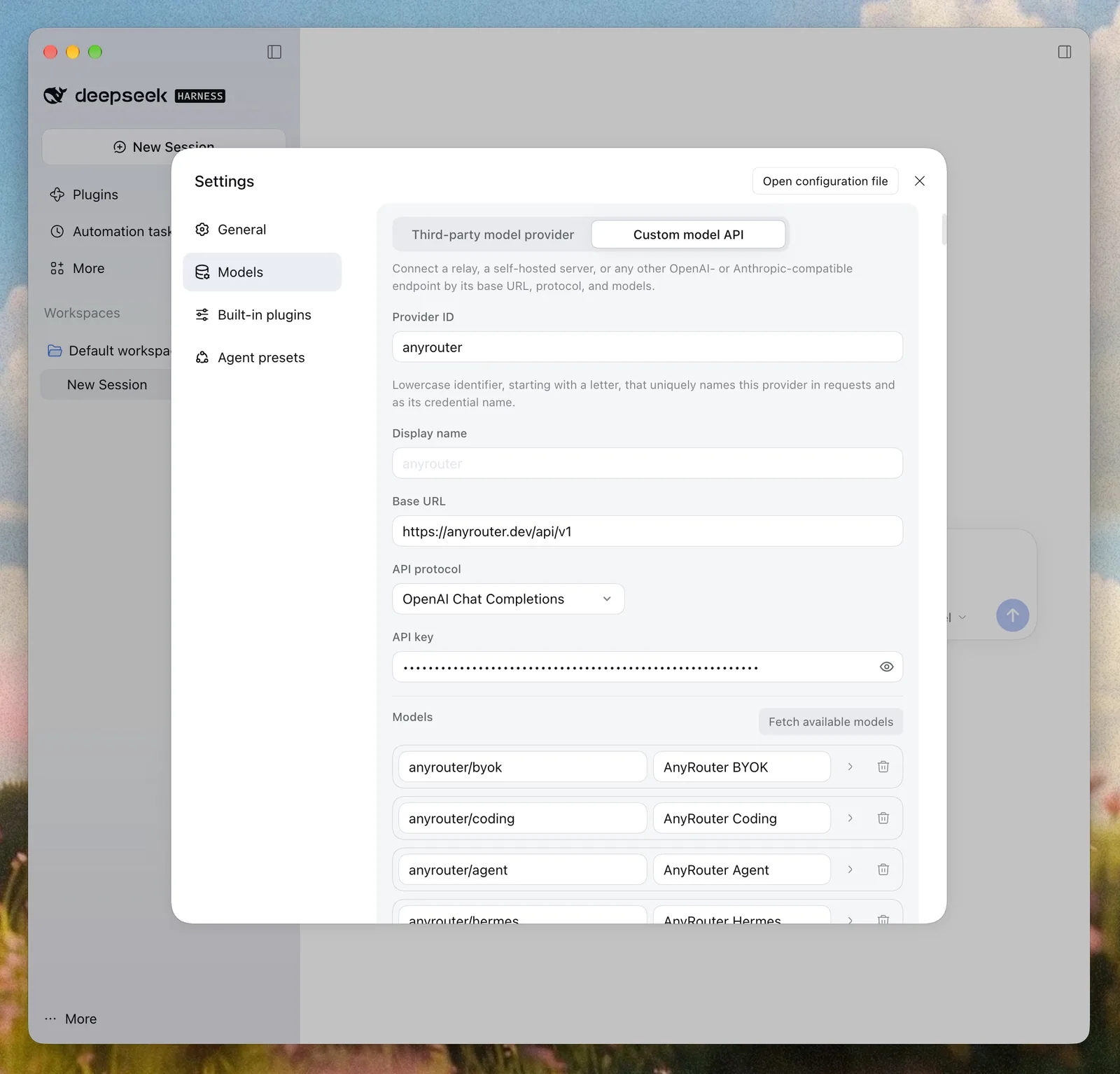
Settings → Models → Custom model API
Provider ID:   anyrouter
Base URL:      https://anyrouter.dev/api/v1
API protocol:  OpenAI Chat Completions
API key:       your sk-ar- key
Models: anyrouter/coding, anyrouter/agent, anyrouter/hermes, anyrouter/auto- 1.Create an AnyRouter key at anyrouter.dev/keys. It starts with sk-ar-.
- 2.In Harness, open Settings, then Models, choose Add model provider, and switch to the Custom model API tab.
- 3.Set Provider ID to anyrouter, Base URL to https://anyrouter.dev/api/v1, API protocol to OpenAI Chat Completions, and paste the key. Harness uses the Provider ID in saved sessions, so you cannot rename it later.
- 4.Choose Fetch available models and tick the anyrouter/* models you want. anyrouter/byok, anyrouter/coding and anyrouter/agent appear only after you add a provider key at /byok. If the fetch lists nothing, type the ids by hand.
- 5.Pick a model in the composer. Use anyrouter/coding if you have your own provider keys, and anyrouter/hermes if you do not. Both route only to models that can call tools.
Why use this
DeepSeek Harness is an open-source agent app from DeepSeek, in preview. Its built-in providers each need their own key. A custom model API lets one gateway key serve every model, with fallback when an upstream fails.
Other ways to set it up
cordis.patch.yml (Open configuration file)
- id: llm-pi-ai
  config:
    providers:
      anyrouter:
        apiKeyEnv: ANYROUTER_API_KEY
        api: openai-completions
        baseURL: https://anyrouter.dev/api/v1
        models:
          - id: anyrouter/coding
          - id: anyrouter/agent
          - id: anyrouter/hermes
          - id: anyrouter/auto
Anthropic Messages (a second provider)
Provider ID:   anyrouter-messages
Base URL:      https://anyrouter.dev/api
API protocol:  Anthropic Messages
API key:       your sk-ar- key
Endpoints and key
- OpenAI-compatible
- https://anyrouter.dev/api/v1
- Anthropic-compatible
- https://anyrouter.dev/api
- Key
- ANYROUTER_API_KEY (sk-ar-…)
Using your own provider keys? Add each one once, then call anyrouter/byok. Bring your keys →
What you will see
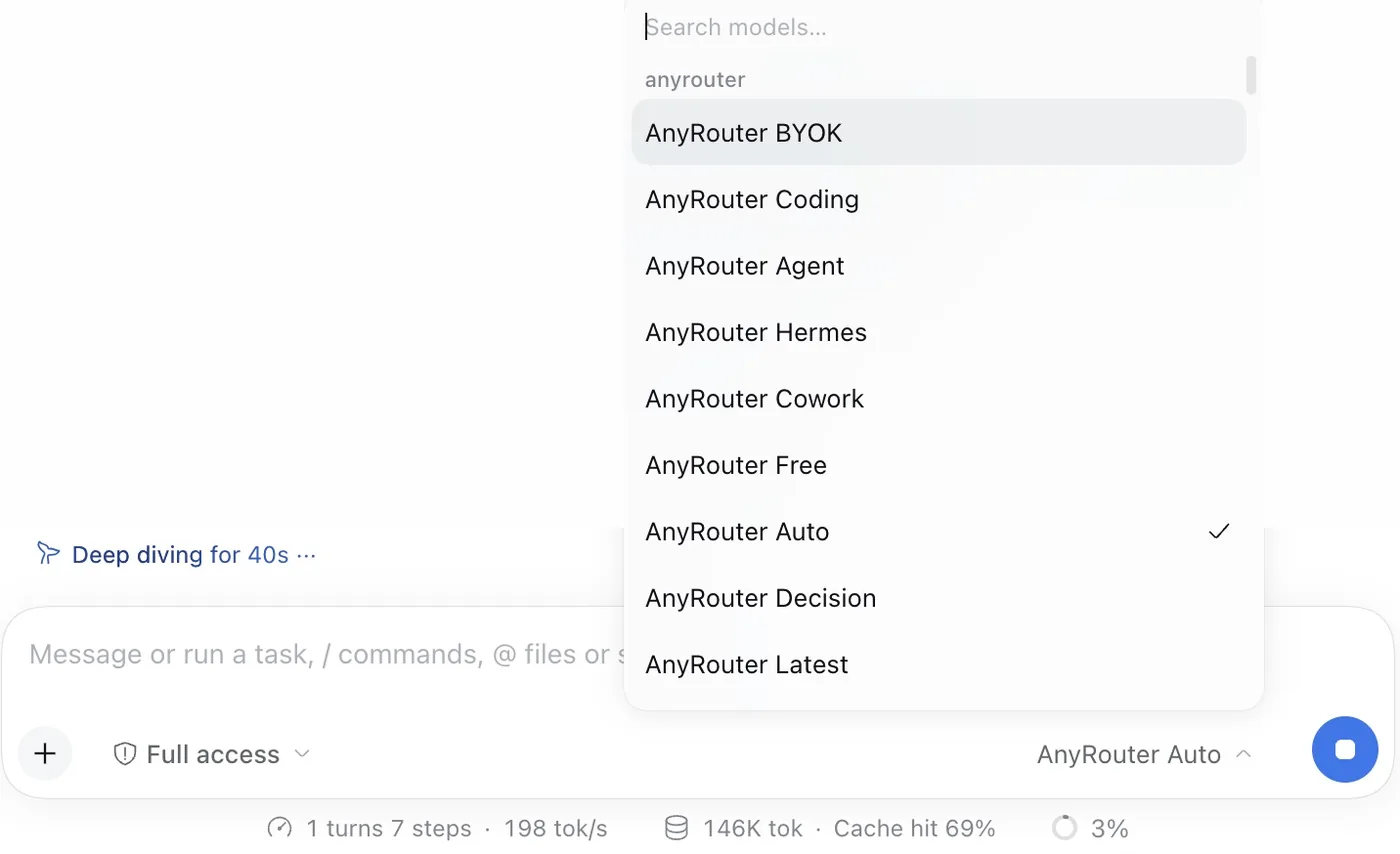
Good to know
- anyrouter/coding, anyrouter/agent and anyrouter/byok route only across your own provider keys, so your provider bills you and AnyRouter takes no credits. Add keys once at /byok.
- anyrouter/hermes and anyrouter/cowork bill AnyRouter credits at each model's rate. anyrouter/auto mixes free and paid hops. A request that carries tools routes only to models that accept them.
- Harness replaces the whole entry config when it applies an override. Keep your other providers in the llm-pi-ai block when you edit cordis.patch.yml.
- For Anthropic Messages, add a second provider with Base URL https://anyrouter.dev/api and no /v1. Harness gives each provider one protocol.
Limits
- With no provider keys saved, anyrouter/coding, anyrouter/agent and anyrouter/byok have nothing to route to.
- anyrouter/decision is for the Decisions API, not chat. Do not pick it for a Harness session.
- DeepSeek Harness is a preview, and DeepSeek warns of compatibility-breaking changes. Its settings screens may change.